



How to Make a Great LEGO City
October 30, 2017
Which are the Best LEGO Modular Buildings to Start With?
October 30, 2017
If you are looking to build a LEGO city and you do not have a lot of space, you might be thinking what is the minimum space needed for a LEGO city.
Of course, this is really your personal choice based on the space you have and what you define as a city. Wikipedia defines city as “A city is a large human settlement. Cities generally have extensive systems for housing, transportation, sanitation, utilities, land use, and communication.”
Some perceive LEGO city to only be a sprawling city with a collection of roads, buildings, sea ports and airports. The truth is, any LEGO city is a cross section or scaled-down version of a real city. So, there is no rule of how small a LEGO city can be, since they are all a snapshot of a real city.
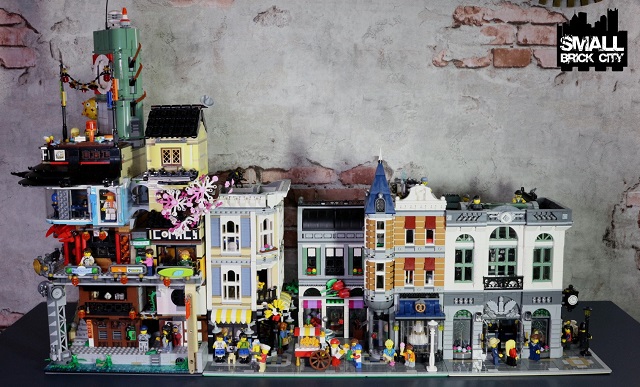
The biggest limitation for your LEGO city (aside from budget to buy the sets/ parts) is likely the availability of space.
One of the design principles of building a small brick city is to maximize space and use it efficiently.
Finding the right space for your LEGO city is important for a satisfactory result and for viewing. Of course, you ideally want to find the biggest space that you can afford (or are allowed).
The size and shape of the space you have depends on your home, office or location that you are building your city in. You can even have several different spaces in your place to hold different sections of your brick city. There is no reason why the city must be all in one single location.
For ease of building and layout, a straight long space is better than a wide squarish space. A space that allows you to set your display without any right-angle turns is preferred. But, if the only space that you have has a turn, like in the corner of a room, you must work with what you have.
When choosing and/ or creating your space, measure the space in terms of LEGO base plate sizes. The standard base plate size is 32 x 32 studs which measures 10.1” x 10.1” or 25.6cm x 25.6cm. The standard half base plate measures 16 x 32 studs, which measures 5” x 10.1″ or 12.8cm x 25.6cm. There is also a larger 48 x 48 studs base plate that measures 15.1” x 15.1” or 38.4cm x 38.4cm.

Standard LEGO base plates. 48 x 48 (grey), 32 x32 (tan) and 16 x 32 (blue)
As these are standard base sizes from LEGO, it is ideal that you try to find a space that fits these base plate sizes as close as possible from each side. If the space is just one or two inches short of allowing you to put a base plate at the end, try to create more space by moving furniture or look for another location.
I highly recommend that you choose and allocate your space based on the standard base plate sizes. This allows your city to be modular and makes it easy to move building positions. Having an odd-sized and odd-shaped builds space will make changes to your city difficult.
In terms of the minimum size of a LEGO city, in my opinion, to create a cross section of a city or a town, you need to have several buildings and some kind of common open space. So, I think a minimum of 4 buildings are required along with a road or common park area in front of the buildings. Assuming you use the standard LEGO modular buildings, each base plate will measure 32 x 32 studs. The common space can be 16 studs deep and stretch across the length of the buildings. So, the minimum space you require is 40.4” x 15.2”. This is the size of a large shelf or a small counter-top.

If you prefer a more squarish layout as opposed to long, you could possibly also arrange two buildings back to back with the common space between the two sets of buildings. In this case, the space required would be 20.2” x 25.2”. This is the size of a small coffee table.
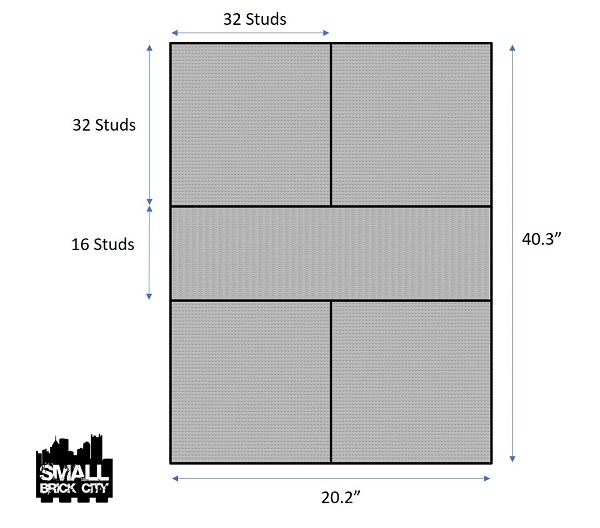
Here is one tip for building a small brick city and if you have space limitations. When you choose your space, maximise not just the area space but the vertical space. Make sure the entire “column” of space that you have chosen is available to you as far as possible. For small brick cities, you will be using multiple levels to create multiple displays that logically fit together to create a mass display.
If your space allows you to create a set-up which you can walk around the city, that is great. But, bear in mind, the walk-around space can be used as real estate for your city. It might be more efficient to set your city against a wall to maximize space.
Do check out the latest update on our LEGO city to see space is fully maximized to create an awesome custom LEGO city.


2 Comments
[…] Check out this useful article on What the Minimum Space for a LEGO City. […]
[…] Check out this useful article on what the minimum space for a LEGO city is. […]